Draft, publish, history
Your changes sit as a draft until you release them — and every version can be restored.
1 Draft or published
The left of the bar always says where you stand. Veröffentlicht (published) means what you see is what visitors see. The moment you change something it flips to Unveröffentlichte Änderungen (unpublished changes) — the live site stays as it was, your work sits safely in the draft. While you type it briefly reads Wird gespeichert… (saving). At the same moment two buttons on the right come alive: the arrow that discards, and Veröffentlichen (publish).

2 Publish
The Veröffentlichen button on the right takes the draft live. It stays grey while there is nothing to publish — then you are already up to date. Check the preview first, ideally in the phone view too.
3 On second thought: discard
The arrow to the left of Veröffentlichen throws the unpublished changes away and brings the published state back. That cannot be undone, so you are asked first. It only appears while a draft exists.
4 The history
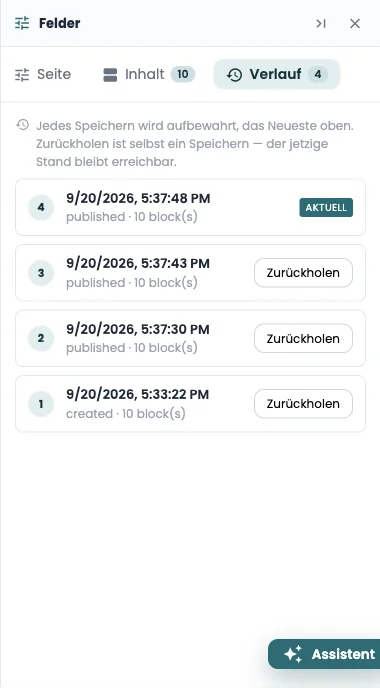
The third tab in the fields panel keeps every save, newest first, with a timestamp and a short note. Zurückholen (restore) makes an older version current again — and is itself a save: the state you were in stays above it in the list and is not lost.
5 What is still open
With no page selected, the middle lists everything that sits in a draft somewhere under Unveröffentlichte Änderungen — with its title and when it was touched. One click opens it. That is the answer to “what did I start the other day?”.